




Picture a boat at anchor in a quiet bay. The most sophisticated, most expensive screen aboard is mounted at the helm — and it’s switched off. Not from carelessness: a chartplotter draws thirty to forty watts, and nobody leaves that burning all night at anchor, not when the same house bank still has to run the anchor light, the fridge and the bilge pump until morning. So at dusk the screen goes dark. Below, around the table, four phones and a tablet glow between courses — switched on, charged, in people’s hands. The one screen built to show what the boat is doing is the one thing aboard you can’t afford to leave on.
And that is the quiet problem — because that dark screen is the boat’s barometer, its wind, its depth: the instruments that, read together, tell you whether the weather is about to turn while everyone sleeps. The one night you’d most want eyes on those readings is the night the screen is switched off to save the battery. That gap — between where a boat’s data lives and where the crew’s attention actually is — is the problem the marine-electronics industry has spent thirty years not quite solving.
What that screen actually is
It’s worth being clear about what the screen at the helm became. One by one, the instruments that each used to have their own gauge on the bulkhead — the depth sounder, the wind, the speed log, the sea-temperature readout, the barometer — were folded into a single network, NMEA 2000, and surfaced on one display. The multifunction display stopped being a chartplotter with extra tabs and became the hub for everything the boat can sense. Its real value was never the glass; it was the network beneath, quietly gathering the whole boat’s data into one place. (The MFD Paradox) Navigation is only one part of what lives there.
Why the hub stayed bolted to the helm
For thirty years that hub surfaced in exactly one place: a screen fixed at the helm. To read the picture anywhere else — the nav station, a second helm, below decks — the only answer was to bolt in another dedicated screen: mounted, weatherproofed, wired, and paid for. Want it in two places? Buy two screens — and pay for them twice over, in money and in power. A pair of MFDs is the better part of eighty watts; leave them lit and that is close to two kilowatt-hours a day, a serious bite out of the same house bank that runs the fridge and the lights. That was the only model that made sense when there was no other screen aboard, so the industry built better and better glass and bolted it, one panel at a time, to the boat.
We think the screen was the wrong thing to perfect.
The best screen is already in your hand
A generation later, the most capable display most people will ever own is the one already in their pocket — replaced every few years at no cost to the boat. The chartplotter at the helm still earns its keep: for navigation you want a proper, dedicated, sunlight-readable plotter and official charts, and that is not changing. What has dated is the assumption that every other place you’d glance at your boat’s data needs its own fixed screen.
The MFD, reframed as software
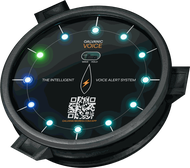
This is the reframing at the heart of the Galvanic Voice. It reads your boat’s data off NMEA 2000, fuses it, and serves it — over the boat’s own WiFi — to the Galvanic App, which runs on the phones and tablets your crew already own. The manual puts it plainly: “Every crew member’s phone or tablet, anywhere on board, becomes a fully-featured MFD.”
It is not the usual companion app, and not a cut-down remote for the screen at the helm. It is the display — chart, AIS, anchor watch, depth, wind, sailing performance — running on every device aboard at once. Be clear about what that means and what it doesn’t: the phone and the tablet are the screen — what you look at, when you choose to look — and never the alarm. The warnings themselves come from the Galvanic Voice, spoken out loud, whether or not a single device is switched on. The screen is for the moments you reach for it; the alarm belongs to the Voice and never depends on you holding anything. The manual’s own framing is that the app “reframes the MFD as software rather than a physical product.” Make that one move, and a row of constraints everyone had accepted as the nature of marine electronics falls away.
What changes when the screen stops being scarce
The helm stops being a bottleneck. On a conventional boat the data lives at one screen, and to read it you go to it. In a crowded anchorage or a busy harbour, the AIS traffic, the depth and the wind — the picture of what is happening around you — is now in every hand at once, and decisions get made, as the manual says, “with everyone seeing the same picture.”
The tablet is the planning table. A phone goes everywhere — that is its job. A tablet does something different: it equals, and often surpasses, a dedicated MFD for screen size, resolution and the sheer amount of information it can lay out at once — and below at the saloon table, where this kind of work actually happens, sunlight readability was never the question. It is the ideal surface for the tasks that want room: planning the passage, poring over the live weather and forecast, weighing the routes. Propped on the table, it is where the crew gathers around one picture and talks it through — the shared planning station a panel bolted to the helm could never be.
Everyone is looking at the same truth. Every Galvanic App device draws from the same Galvanic Voice — a single unit, or a network of units cooperating over WiFi on the same boat — so the depth you read in the saloon is the same live figure shown at the helm: one source of truth, mirrored to every screen, rather than separate apps quietly disagreeing.
The cost of another screen falls to zero. The app is free: no per-screen licence, no proprietary connector. An old phone left in a drawer becomes a dedicated display — mount it on a bulkhead, charge it from a USB socket, and it works just like a fixed screen aboard, without the price and without the installer.
Access fits the person holding it. Not everyone aboard should be able to change everything. The app carries each user’s role — Owner, Captain, or Crew — so a guest can see the picture and keep an eye on the anchor without being able to reconfigure the system.
The same MFD, from anywhere
When the boat is online, none of this has to stay on the boat. The same app, on the same phone, becomes a fully-functional MFD from anywhere in the world — the restaurant ashore, the office, another country. You can see the boat holding inside its anchor-watch circle while you are at dinner, check the boat’s telemetry from home across the winter, and get a notification the moment something needs attention. There is no separate “remote” product to unlock: it is the same software you use on board, carried over an end-to-end encrypted link.
Back to the boat at anchor
Which brings us back to that quiet bay — except now the dark helm screen costs you nothing, because the boat’s barometer, wind and depth are in every bunk and every pocket. The picture is no longer locked to one seat at the wheel: the same live readings the helm would show are there to glance at from the saloon or below — the boat’s data within reach anywhere aboard. Raising the alarm stays the Voice’s job, not any screen’s.
And the readings that matter most overnight are not the chart — they are the barometer, the wind and the depth: the pressure falling faster than the forecast promised, the wind backing and building, the water shoaling under the keel as the tide and a swell come in. Read together, in time, those are how you decide to let out more rode, re-set in better holding, move to safer shelter, or simply set a tighter anchor alarm and stay up. They are safety-critical calls, and they rest on instruments that never sleep.
This is the trade the conventional boat can’t escape — the one the dark helm screen was about from the first paragraph: keep the screen lit and watch the house bank drain, or switch it off at dusk and let the boat’s senses sleep on the very night you’d want them awake.
The Galvanic Voice ends that trade. It stays on for about a watt — idling near 90 milliamps at 12 volts, a trickle beside a single cabin light — all night long. It reads wind, depth, water temperature and barometric pressure off NMEA 2000 and brings live weather and forecast into the app — and when the pressure starts falling it doesn’t wait for anyone to be looking. It says so out loud: “Barometric pressure falling, [N] millibars per hour.” The phone showing you the picture is on its charger anyway. So the boat’s senses no longer go dark at dusk — keeping them on no longer costs you the battery.
The part that makes it safe to rely on — and safe not to
There is an obvious objection to putting your boat’s data on a phone: phones die. Batteries go flat, screens crack, devices get left on the dock. We agree completely — which is exactly why none of the safety depends on them.
This is the line we will not cross, and it is worth being precise about. The Galvanic App is a convenient portable MFD. It is not part of the safety chain. No critical safety function depends on a phone, a tablet, or any monitoring device at all. The Galvanic Voice unit and the Galvanic Pulse bracelets monitor the boat and the crew twenty-four hours a day, with or without internet, with or without a single phone switched on. If every device aboard is off, dead, or ashore, the Voice still speaks its alarms aloud and the Pulse still monitors each person on board.
We’ve written before that a smartphone makes a poor alarm system, and we meant it (Your Phone Won’t Save You) — and that a screen, by its nature, only ever reaches the person already looking at it (Complementary to Your MFD, The Screen That Doesn’t Save You). The phone is not your alarm; it is your window. The alarm is the marine intelligent voice alert system that speaks the warning out loud, by name, whether or not anyone is holding a screen — and the bracelet that triggers an automatic man-overboard alert with no button to press. The app shows you the picture whenever you want it; it is never the thing that raises the alarm. That distinction is the whole architecture, and it is what makes putting the data on a phone an advantage rather than a risk.
The screens were already aboard
You do not need to wire in another screen to put your boat’s data in every hand. Your crew brought theirs — better ones than the helm had a decade ago, already charged, already in use. Keep your chartplotter for navigation; that is its job, and the Galvanic Voice is not trying to take it. But for everything else — the anchor watch, the AIS picture, the depth and the wind, the barometer and its falling-pressure warning — every device aboard becomes the screen, free, the moment the Galvanic Voice is aboard.
The Galvanic App is a free download from the App Store and Google Play. The Galvanic Voice is €950 ex-VAT — pre-order now and you’ll get two Galvanic Pulse bracelets as standard, plus four more free during the pre-order window. Ships Q4 2026.
Pre-Order the Galvanic Voice →
Complementary to Your MFD — why the Voice is not a replacement for your chartplotter.
The Screen That Doesn’t Save You & Your Phone Won’t Save You — the design philosophy on screens, phones and alerts.


Leave a Reply