
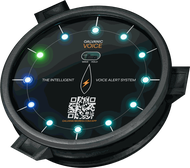




The modern boat’s nav station is a wall of glass. A multifunction display with the chartplotter, a second one with the AIS overlay, a third with radar, a tablet at the chart table running a routing app, a phone on the binnacle running another, the autopilot head, the engine display, the NMEA gateway diagnostics. Every panel is beautifully rendered. Every one has hundreds of submenus. Every one is a screen — meaning every one requires the skipper to be looking at it to find out what is happening.
Modern sailing, on the equipment side at least, has become as much an exercise in screen management as in seamanship. And the unspoken question, which nobody on the marketing side of any of those products wants to ask out loud, is this: does any of that glass actually wake you up when you need to be woken?
The Rules That Force You to Look — Whether You Can or Not
This is not a matter of aesthetics or personal preference. It is, in the strict legal sense, an obligation. The Convention on the International Regulations for Preventing Collisions at Sea — the COLREGs, in force since 1972 and amended several times since — places three duties on every skipper that, taken together, force the modern wall of glass into the centre of the legal picture.
Rule 5 — Look-out. “Every vessel shall at all times maintain a proper look-out by sight and hearing as well as by all available means appropriate in the prevailing circumstances and conditions so as to make a full appraisal of the situation and of the risk of collision.”
The plain reading is unforgiving. Rule 5’s “by all available means” is not a flourish — it means exactly what it says. If you have a radar on board, Rule 5 is asking you to use it. If you have AIS, Rule 5 is asking you to use it. If you have a chartplotter, a depth sounder, a wind sensor and a weather receiver, the rule is asking you to use them too.
Rule 7 — Risk of collision. “Proper use shall be made of radar equipment if fitted and operational, including long-range scanning to obtain early warning of risk of collision and radar plotting or equivalent systematic observation of detected objects.”
Rule 7 leaves even less ambiguity. The equipment, where it exists, must be used — and used systematically, not glanced at occasionally.
Rule 2 — Responsibility. “Nothing in these Rules shall exonerate any vessel, or the owner, master or crew thereof, from the consequences of any neglect to comply with these Rules or of the neglect of any precaution which may be required by the ordinary practice of seamen, or by the special circumstances of the case.”
And Rule 2 closes the door. No court, no marine accident investigation board, and certainly no insurer will accept “I had it but I wasn’t watching it” as a defence. The equipment you have aboard is, by the act of being aboard, equipment you are presumed to be making proper use of.
The Paradox of the Look-Out You Cannot Avoid
This produces a vicious arithmetic that we suspect nobody likes to think about clearly. Each new screen makes you a worse look-out, in the absolute sense, because every minute you spend looking at the screen is a minute you spend not looking at the water and the horizon. But the law says you must look at the screen, because it is there and the rules require proper use of all available means. The chartplotter that was sold to help you has, in legal effect, handed you another full-time job.
The arithmetic only worsens. A second screen does not add capability and stop there; it adds another full-time attention demand. By the time the modern cruising boat is carrying five or six glowing surfaces, the watch-keeper has, on paper, several full-time look-out duties to perform simultaneously. In practice, of course, nobody does. They glance at one, then at another, then at the water. The system does not break gracefully when the screens accumulate; it breaks silently, by attention starvation, with the watch-keeper still feeling diligent.
And — In Daylight — the Sun Is Already Winning
Set the night, the operating system, and the legal paradox aside for a moment. There is a daylight problem with screens that nobody on the marine-electronics side of the industry seems particularly eager to confront directly. A boat’s nav station — and certainly the helm — is, by definition, often outdoors. The sun on a clear day pours several hundred watts per square metre of broadband light onto every surface that faces it, of which a substantial fraction lands in exactly the visible band the eye is trying to read on the chartplotter. The screen, to remain legible, has to compete with that incoming flux directly.
The arithmetic, when laid out plainly, is uncomfortable. A ten-inch screen has a face of about 0.03 m². At clear-noon irradiance of roughly 1,000 watts per square metre, that face is being illuminated by 20 to 30 watts of sunlight continuously through the day (depending on the angle at which the screen meets the sun). A modern “sunlight-readable” marine chartplotter at peak brightness draws 12 to 18 watts of electrical input — and almost all of it ends up as heat in the LED backlight, the polarisers, and the colour-filter stack of the LCD itself. The fraction that actually leaves the front of the glass as image light is small.
But broadband watts is not the right yardstick. What matters for legibility is the luminance of the rendered image (measured in cd/m², commonly called “nits”) against the luminance of the ambient sunlight reflected off the screen’s own glass. A typical LCD reflects about five percent of incident light even with anti-reflective coatings; at outdoor noon illuminance of around 100,000 lux, the reflected luminance off the screen surface is on the order of 1,600 nits. The display has to put out more than that just to break even with its own reflection.
Two rungs of the resulting ladder are worth distinguishing plainly, because they cost very different amounts of power:
- Acceptable luminosity — roughly 2,500 to 3,000 nits, marginally dominant over the ambient reflection. The better marine chartplotters live here. The electrical cost is in the tens of watts — 30 to 50 W at peak brightness on a ten-inch panel. Readable, but not comfortable.
- Genuine dominance — around 16,000 nits, roughly ten times the reflected ambient, so the rendered image is unambiguously brighter than the sunlight on the surface. The electrical cost is in the hundreds of watts — somewhere around 200 W on a ten-inch panel. No consumer marine display is in this range, and on a cruising boat’s power budget, none ever will be.
Even the lower rung, however, is a significant problem for a device that is supposed to be monitoring the boat twenty-four hours a day. “Tens of watts” only at peak brightness becomes tens of watts for most of the daylight hours when a screen is genuinely doing its job — and across a day, that is the better part of a kilowatt-hour, every day, per screen. Two screens, two kilowatt-hours. On a cruising boat whose battery bank is charged from limited solar or a noisy diesel, that is the entire energy story before the refrigeration, the autopilot, the instruments and the navigation lights have even started. It is why sailors toggle the brightness down, then shut the screen off, then forget it is off, then miss the alert the screen was meant to deliver — and back to the rest of this post’s argument. (We work through the wider energy story behind these figures in our companion piece The Price of a Watt.)
The practical consequence is one every reader of these pages already knows from their own helm: polarising sunglasses, the hand-cupped shade over the screen, the body angled to put the head in the way of the sun, the brightness wound up until the screen has eaten half the day’s amp-hours, the still-unreadable display. The contest is between a backlit panel and a star. The star is winning by a margin no consumer-grade display can close.
Which lands the rest of this post’s argument from the other side. A screen is the wrong tool for delivering urgent information in daylight on an open deck, not because anyone designed it badly, but because the eye cannot read what it cannot see, and the sun decides what it cannot see. The contest disappears the moment you stop trying to win it — by letting the urgent information leave the screen and arrive instead at the ear, where the sun, for all its power, cannot get at it.
The Phone Was Designed Against You
A reasonable reader might at this point say: fine, replace the chartplotter with a marine app on a tablet or a phone, and at least the screen is in the cockpit with me. We have written about this elsewhere — in the companion piece Your Phone Won’t Save You — but the short version is worth saying again. The phone is, of all the candidates for the job of marine watch instrument, the worst one ever offered.
Phones were not designed to monitor. They were designed for the attention economy: short-lived foreground sessions with notifications scheduled by the system on its own terms, batched, deferred, and where necessary suppressed, for the sake of battery life and user experience. The operating systems themselves are now explicit about this:
- iOS tightly restricts what an app can do in the background. The user-facing setting is called Background App Refresh; the underlying behaviour is more aggressive than the name suggests. Apps are paused, suspended, terminated or simply not scheduled, by the operating system, on its own schedule, in the interests of battery life. A marine alarm app that depends on running in the background to push a notification to the lock screen is fighting a system that has decided, by default, that pushing background notifications is suspicious behaviour.
- Android‘s Doze mode and App Standby framework do effectively the same thing — devices that have been idle for a few minutes enter a low-power state in which background work is heavily throttled, and apps that the user has not interacted with recently are placed in restricted buckets that limit their access to network and CPU.
Both behaviours are entirely reasonable for the device’s intended use case, which is being a phone. They are catastrophic for the device’s pretended use case, which is watching over a boat in the dark while its owner sleeps. The notification you needed at three in the morning is the notification the operating system silently dropped, at 02:55, because the app had been backgrounded for too long — for your battery’s sake, naturally.
And Yes — We Have Done It Ourselves
We would be ridiculous if we put ourselves above this argument. Piero has, by his own admission, spent years running an anchor-watch tablet on board — an iPad Pro, plugged in nightly, kept awake against its will, with a household Bluetooth-streaming camera pointed at its screen so that the camera-app could relay the picture ashore. The full version of that confession is in our anchor-alarm piece, The Intelligent Anchor Alarm. Suffice to say that even the founders, who knew better, had been improvising around the same problem with household electronics. The wrong tool. For the wrong function. Knowingly. Every night.
It is, in the end, what told us we were building the right product.
The Shift — What Is a Screen Actually For?
Once you accept that the screen cannot reliably do the job of alerting — because the eye cannot be everywhere at once and the phone OS is actively against you — the question turns the other way. What is a screen actually good for?
The answer is much narrower than the marine market currently pretends. A screen is good for digging. For pulling up the history of an alert after it has already fired, and the boat is calm again, and the human wants to understand what happened. For inspecting the CPA geometry of an encounter before committing to the steering decision. For browsing the polar your boat drew of itself last week, and comparing it to the polar from the season before. For reviewing the wind trend over the last twenty-four hours when planning tomorrow’s departure.
A screen is, in other words, an instrument for investigation, not for notification. The sailor who is calm and curious is the sailor for whom a screen makes sense. The sailor who is asleep, or steering in fog, or has just heard a strange noise on deck, is the sailor for whom a screen is precisely the wrong place to be told anything urgent. Wake-up is not what screens do. Wake-up is what a voice does.
This is the foundational design choice behind the Galvanic Voice and the Galvanic app. The voice handles the alert. The screen handles everything else. Neither of them is asked to do the other’s job — which is the first thing every other product in this market gets wrong.
The Galvanic App’s Driving Principle
The Galvanic app captures as much honest information as the boat can produce — every reading on the NMEA 2000 bus, every alert event, every fatigue trace from the bracelets, every AIS interaction, every passage in the log, every minute of every polar — and presents it on the screen for the moments when the sailor is calm and curious. None of it is asked to wake anybody up. None of it depends on the user looking at the right glass at the right second.
The app is built around a small set of strict design rules, which we honour even when they make the marketing department uncomfortable:
- The app is never the alarm. If the boat needs to wake the crew, the Galvanic Voice does it. The app may show the same information later, in the timeline, for the sailor who wants to understand what happened. The app never substitutes for the voice.
- The app never lies about confidence. Every measurement comes with an uncertainty disc; every polar with a sample count; every alert with the data it was decided on. The screen shows less when the boat knows less, not a fake number to fill a UI placeholder.
- The app honours offline. Boats spend days out of cell range. The app works locally on the boat over Wi-Fi and Bluetooth, with shoreside backup sync when a connection happens to exist — never the other way around.
- The app is for the calm half of the day. Trim review at breakfast. Polar comparison at lunch. The wind forecast in the evening. The voice handles the night.
And — Looking Forward — Why the Division Matters More, Not Less
The voice-versus-screen division of labour matters more in the years immediately ahead, not less. Continuous shoreside internet at sea is no longer a luxury. Starlink Maritime is now common on cruising boats; Iridium Certus and similar satellite services handle the gaps; coastal 5G covers the rest. The next decade will normalise always-on connectivity nearly everywhere a sailing boat can plausibly find herself.
With that connectivity comes a new class of advisor. AI sailing assistants that look down on your trim from satellite imagery and tell you the genoa is twisting at the head; that integrate your boat’s polar with a thirty-six-hour ensemble forecast and suggest a reef is overdue, given the building swell two hundred miles ahead; that have read every passage log of every similar boat in the harbour and have informed opinions about how to set your jib leads tomorrow morning. That advice is genuinely useful, and it is coming.
And it belongs on a screen. In the calm minutes between watches, over coffee, with the sailor curious and unhurried. Not as an interruption in the middle of a tack. The advice is for the eye. The urgency is for the ear. The Galvanic app is being built today with that future shape in mind: a place where shoreside intelligence from orbit, on-board intelligence from the Voice, and the sailor’s own attention can meet calmly — and where none of them is ever in the position of having to shake the sailor awake. That job belongs to the voice, and the voice alone.
The Screen Is Not the Alarm. The Voice Is.
The COLREGs require you to use every available means. Modern boats give you more available means than any watch-keeper can plausibly attend to. The wall of glass at the nav station is, paradoxically, a legal obligation that also makes you a worse look-out the more of it you accept. The phone in your pocket is not the answer — and the operating system on which the phone runs has been deliberately engineered, by people who care about your battery more than your boat, against the very use case you wanted it for.
The Galvanic Voice’s role is to break that trap. The urgent stuff — the drag, the depth, the CPA, the MOB, the wind approaching the catenary limit — reaches the sailor through the channel sailors actually have available even when their eyes are closed: the ear. The screen is then released to do what the screen is actually good for. To dig. To browse. To compare. To learn.
The screen is not the alarm. The voice is. The screen is what you go back to in the calm afterwards — to learn from what the voice told you, and, increasingly, to let the next generation of shoreside intelligence help you set the boat up better tomorrow than it was today.
References
- International Maritime Organization. Convention on the International Regulations for Preventing Collisions at Sea (COLREGs), 1972, as amended. Particularly Rule 2 (Responsibility), Rule 5 (Look-out) and Rule 7 (Risk of collision) — quoted in the post.
- International Maritime Organization. Resolution MSC.302(87): Adoption of Performance Standards for Bridge Alert Management. (The IMO framework on graduated alert delivery, acknowledgment, and channel-appropriate notification — the framework the voice-versus-screen division of labour respects.)
- Apple Inc. iOS Developer Documentation — Background Execution. (The reference for the scheduling, suspension, and termination behaviour the iOS operating system imposes on backgrounded apps; the mechanism behind the “Background App Refresh” user setting.)
- Google. Android Developer Documentation — Optimize for Doze and App Standby. (The reference for the Doze low-power mode and the App Standby Buckets that restrict background work on Android devices.)
The Intelligent Anchor Alarm — Piero’s full iPad / Blink-camera confession, and the product designed to make it unnecessary.
Why the Galvanic Voice Is Complementary to Your MFD — the screen-versus-voice argument applied to the chartplotter specifically.
Galvanic Works technology — the engineering philosophy behind every design choice on the boat.


Leave a Reply